
Privacy
What Goldfish captures, what it masks, and what leaves your device.
Goldfish reads the text of the foreground window through the operating system’s accessibility layer. No screenshots, no screen recordings, text only.
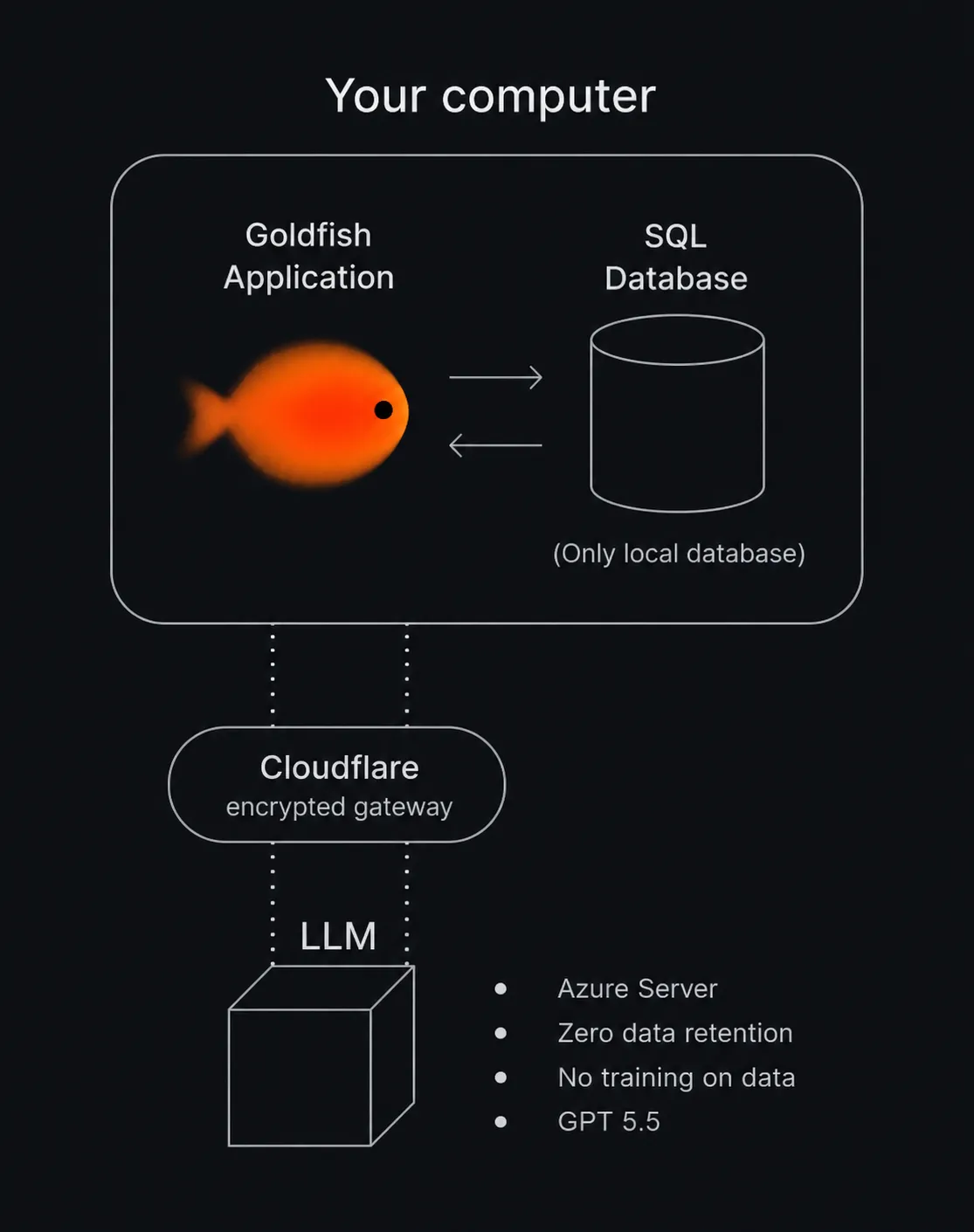
Your memory stays on your device
Everything Goldfish captures, and the summaries, wiki pages and profile it builds from it, is stored in a local database on your computer. Goldfish keeps no copy. It is not synced, backed up, or uploaded anywhere.
What leaves your device
Your memory database never leaves your device. Text does leave it in two cases:
- When you ask Goldfish to do something, like draft a reply, answer a question, or take dictation.
- When background features organize and personalize your local memory.
In both cases Goldfish sends only the context the task needs, never your whole history. Requests pass through Cloudflare, which does not store or log their contents, to a private Azure OpenAI deployment with zero data retention. Microsoft processes the request and does not store it or train on it. Voice dictation goes through the same deployment.
Goldfish does not sell your data, and nothing you do in Goldfish is used to train AI models.
If you sign in, your account details (name, email, plan) are stored with our account provider, and billing is handled by Stripe. Product analytics are limited to usage events and never include captured text. The full list of providers is in the Privacy Policy.
Pause capture
Capture can be paused any time, from chat, Settings, or the tray icon, for a set duration or indefinitely.
The blacklist
The blacklist excludes apps or browser domains from capture entirely. Manage it in Settings under Privacy, or just ask in chat: “never capture my banking site”.
If your organization manages your Mac, it can add exclusions too. They show in Settings on the Ignore list page, under “Set by your organization”. See Configure Goldfish with MDM.
Masking at capture time
Before anything is saved, Goldfish masks passwords, API keys, access tokens, private keys, card numbers and security codes, IBANs, and US Social Security numbers. It never reads password fields, and by default it skips banking sites, password managers, and private browsing windows.
Masking uses pattern detection and cannot catch everything. It does not remove names, email addresses, or phone numbers, and text you type into Goldfish yourself (a chat message, a rewrite request) is sent as written. To keep an app or site out entirely, add it to the blacklist.
Local connections only
The local service that powers chat and the MCP server accepts connections only from your own machine, protected by a per-install token.
Deleting your data
Settings under Privacy has a delete-all-data option that wipes the local database. This cannot be undone. Your memory is not stored anywhere else, so nothing else needs deleting. For account or billing data, contact support@goldfish.sh.